Reimagine Workforce Productivity with Microsoft 365 and Copilot
Enhance collaboration, strengthen security, and boost operational efficiency with Microsoft productivity tools through our Modern Work workshops, tailored specifically for Philippine SMBs and enterprises.
M365 E3/E5 Accelerator
Speed up your Microsoft 365 deployment and empower your organization with advanced security and seamless collaboration tools.

Copilot Value Discovery
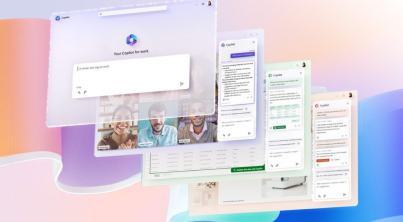
Harness the potential of AI to drive growth, optimize costs, and support your workforce’s wellbeing with Microsoft Copilot.
Customer Evaluation Accelerator
Discover the true value of Microsoft 365 Copilot with tailored industry insights and practical, hands-on experience.

M365 E3/E5 Accelerator
Speed up your Microsoft 365 deployment and empower your organization with advanced security and seamless collaboration tools.
Key Benefits
-
Quick Deployment for Immediate Impact
Our proven approach delivers a swift and efficient Microsoft 365 implementation, enabling your teams to start collaborating and working productively without delay.
-
Comprehensive Security from the Start
We prioritize safeguarding your data and user identities by integrating Identity and Access Management and Microsoft Intune early in the deployment.
-
Tailored Solutions for Your Business
This program is customized to address your organization’s unique needs, including email migration, data protection, and comprehensive user training to ensure smooth adoption.
Who Is It Designed For?
This accelerator is ideal for organizations with 300 or more Microsoft E3/E5 licenses seeking a fast and secure Microsoft 365 deployment. Perfect fit for businesses focused on boosting collaboration and productivity while ensuring strong security and minimizing operational disruptions.
Copilot Value Discovery
Harness the potential of AI to drive growth, optimize costs, and support your workforce’s wellbeing with Microsoft Copilot.
Key Benefits
-
Maximize Business Impact
Learn how AI-powered tools can help your organization boost revenue, streamline operations, and foster a more engaged and productive workforce by leveraging tailored insights and real-world examples.
-
Strategic AI Opportunities
Uncover AI initiatives that align with your unique business challenges. See how Microsoft Copilot can deliver targeted solutions designed to meet your specific needs.
-
Detailed Adoption Plan
Detailed Adoption Plan
Who Is It Designed For?
This discovery workshop is intended for Philippine enterprises with 300 to 6,000 Microsoft 365 users who actively leverage Office 365, Azure Active Directory, Exchange Online, SharePoint Online, Teams, and Microsoft 365 Apps. Suited for organizations seeking to evaluate AI opportunities and develop a robust business case for the adoption of Microsoft Copilot.
Customer Evaluation Accelerator
Discover the true value of Microsoft 365 Copilot with tailored industry insights and practical, hands-on experience.
Key Benefits
-
Industry-Focused Business Case
Engage with real-world scenarios designed for your specific industry to understand how Microsoft Copilot can drive tangible improvements in your daily operations.
-
Data-Driven Insight
Receive actionable feedback grounded in real-world data that builds confidence in your investment and strengthens your business case for integrating Copilot into your workflows.
-
End-to-End Expert Guidance
Leverage dedicated guidance from our specialists who help identify key stakeholders, empower internal champions, and equip IT teams with the knowledge and tools needed for a smooth, successful deployment.
Who Is It Designed For?
This workshop is specifically designed for organizations with 50 or more Microsoft 365 Copilot licenses. Best for companies seeking a comprehensive understanding of how Copilot can enhance business processes and boost productivity. The program enables decision-makers to assess Copilot’s real-world impact, gather valuable insights, and establish a solid foundation for a successful, organization-wide implementation.
Frequently Asked Questions
What are Microsoft work productivity tools available in the Philippines?
Microsoft offers a full suite of work productivity tools in the Philippines through Microsoft 365. These include Word, Excel, PowerPoint, Outlook, Teams, SharePoint, OneDrive, and Planner, which help teams create documents, manage tasks, store files, and collaborate in real time. For businesses seeking automation and deeper insights, tools like Power BI and the Power Platform (Power Automate, Power Apps, Power Virtual Agents) are also available. These solutions support both office-based and remote work across industries such as BPO, education, healthcare, and finance.
At Tech One Global Philippines, we help organizations adopt, integrate, and maximize Microsoft 365 tools. From migration and setup to user training, security configuration, and ongoing support, our team ensures you get the most out of Word, Excel, Teams, Power BI, and more—so your workforce stays productive, collaborative, and secure in the digital workplace.
Is Microsoft Teams included in Microsoft 365 in the Philippines?
Yes. Microsoft Teams is included in most Microsoft 365 plans available in the Philippines. It allows teams to chat, join video meetings, share files, and collaborate in one secure platform. Whether your organization is remote, hybrid, or office-based, Teams helps keep communication and workflows organized. It is widely used across businesses, schools, and government offices for meetings, group projects, and virtual training.
As a multi-awarded Microsoft Partner in the Philippines, Tech One Global helps organizations deploy and optimize Microsoft Teams as part of their Microsoft 365 environment. Our services include setup, integration with existing systems, user training, and security configuration, ensuring that your team gets the most out of Teams for seamless communication and productivity.
Where can I get Microsoft productivity solutions for my business in the Philippines?
You can get Microsoft productivity tools from official Microsoft partners, resellers, or directly from the Microsoft website. As a trusted Microsoft Solutions Partner, Tech One Global Philippines helps businesses select the right Microsoft 365 plan, handle deployment and migration, and provide end-user training and ongoing support. Our team ensures your Microsoft apps are not only installed but also optimized for your workflows, so your business can achieve maximum productivity from day one.
Are there local providers of Microsoft work tools and services in the Philippines?
Yes, there are certified Microsoft partners in the Philippines that help set up, train, and support businesses using tools like Microsoft 365, Teams, SharePoint, and Power Platform. One of them is Tech One Global Philippines, which helps support businesses of all sizes by delivering end-to-end Microsoft services—from licensing and deployment to custom integrations, user training, and managed support. With our local expertise, we ensure your Microsoft tools are set up to fit the way Philippine businesses work, enabling your team to collaborate efficiently and securely.
Can Microsoft 365 be used for remote work in the Philippines?
Yes. Microsoft 365 is widely used in the Philippines for remote and hybrid work because it provides cloud-based tools that employees can access anytime, anywhere. With Microsoft Teams for meetings and collaboration, OneDrive for secure file sharing, and Outlook for email and scheduling, teams can work together seamlessly across devices—whether on a laptop, tablet, or mobile phone. This makes Microsoft 365 an ideal solution for companies with remote or hybrid setups, ensuring productivity and collaboration even when teams are in different locations.
Are Microsoft productivity tools secure for business use in the Philippines?
Yes. Microsoft 365 productivity tools are secure for business use in the Philippines because they come with built-in enterprise-grade security features such as multi-factor authentication (MFA), data encryption, advanced threat protection, and data loss prevention (DLP). These safeguards protect emails, files, and user access while giving businesses centralized control over security settings through the Microsoft 365 Security & Compliance Center. Microsoft also complies with global standards and local regulations such as the Data Privacy Act of 2012 (RA 10173), ensuring safe use for Philippine businesses.
Do Microsoft partners in the Philippines offer training for work tools?
Yes. Microsoft partners in the Philippines provide training programs for tools like Microsoft 365 apps (Word, Excel, PowerPoint, Outlook), Teams, SharePoint, OneDrive, and Power BI. These training sessions are often customized by role, department, or industry, helping employees use the tools more effectively in their daily tasks. Training ensures teams can communicate, collaborate, and manage documents efficiently, which maximizes the value of a company’s Microsoft 365 investment.
At Tech One Global Philippines, we deliver hands-on workshops, onboarding programs, and role-based training designed to help your workforce adopt Microsoft tools faster. From basic user onboarding to advanced Power BI and Power Platform sessions, our training equips teams with the knowledge to work smarter, automate processes, and collaborate securely across your organization.
Ready to build a smarter, more secure workplace?
Connect with us today to talk about how we safeguard your business and enhance collaboration!