Discover a better way to work with Microsoft Copilot AI by your side.
Microsoft Copilot AI for teams in the Philippines transforms everyday productivity. It uses the power of AI to support content creation, decision-making, and collaboration across Microsoft 365. Whether you’re preparing reports, planning strategy, or catching up on meetings, Copilot helps your team move faster, with more clarity and less manual work.
Explore each Copilot solution and how it supports your work.
See how Microsoft Copilot drives better performance, faster results, and more engaged teams.
Boost creativity and streamline your workday with AI assistance across even more Microsoft 365 apps.
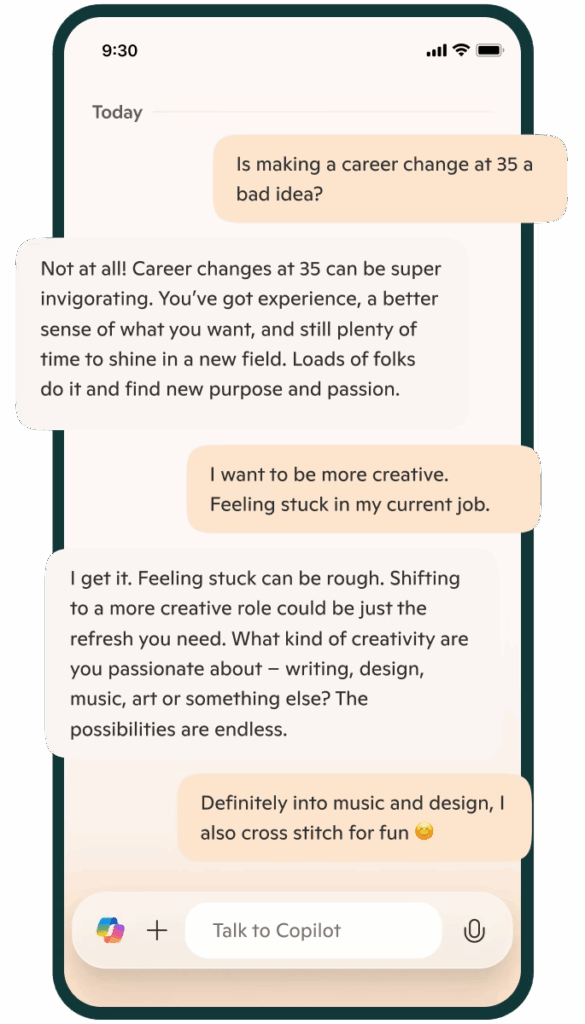
Stay connected wherever work takes you. The Microsoft Copilot mobile apps for Android and iOS bring smart, AI-powered support to your fingertips. Whether you’re replying to emails, creating content, or managing tasks, Microsoft Copilot helps you stay productive on the move. Designed for busy professionals in the Philippines, it’s the smarter way to work from anywhere.
Partnering with Tech One Philippines is not just about adopting Microsoft Copilot. It’s about enabling meaningful transformation that drives productivity, growth, and long-term value.
As a trusted Microsoft Solutions Partner in the Philippines, we combine deep expertise in AI, cloud, and digital modernization to help you plan, implement, and get the most out of Microsoft Copilot—tailored to your organization’s goals.
Microsoft Copilot is an AI-powered assistant designed to help you with a wide range of tasks. It leverages advanced AI technologies, including natural language processing and machine learning, to provide support in various areas such as productivity, information retrieval, and creative tasks. It helps you write, analyze, and automate tasks in apps like Word, Excel, Outlook, PowerPoint, and other solutions across the Microsoft ecosystem. Tech One Global is a top Microsoft partner that can help businesses like yours integrate Copilot in your day-to-day operations.
Microsoft Copilot works by leveraging advanced AI technologies to understand and respond to your queries. It uses Natural Language Processing (NLP), Machine Learning, Web Search Capabilities, and it's integration within the Microsoft ecosystem to generate relevant content based on your work data. For best practice for integration and how to get the most value our of Copilot, contact Tech One Global today!
Copilot is available in Microsoft 365 apps like Word, Excel, PowerPoint, Outlook, Teams, and OneNote. Microsoft Copilot AI is also available in other Microsoft solutions like Azure, Fabric, PowerBI, PowerApps, and Copilot Studio, to mention a few. Tech One Global helps businesses roll it out across teams, ensuring smooth integration and proper data access.

Yes. With Microsoft Copilot, your data remains your data. It follows Microsoft’s enterprise security and compliance standards for data privacy, encryption, compliance, and access controls. Microsoft Copilot also receives regular updates to its security protocols to address emerging threats and vulnerabilities. Tech One Global can guide your IT team in setting up proper access controls and data protection when enabling Copilot
Yes, Microsoft Copilot typically requires a special license to access its full range of features. This license is often part of specific Microsoft 365 plans or subscriptions. Depending on the plan, you may get access to Copilot's capabilities within various Microsoft applications like Word, Excel, PowerPoint, and more. Tech One Global can help you assess your current setup and guide license upgrades based on your team's needs.
It can analyze data, generate formulas, create charts, clean data, and create summaries from raw data. What's more, Copilot in Excel can help provide insights and recommendations based on your data, such as forecasting trends or highlighting key metrics. Tech One Global provides training so teams can make the most out of Copilot in Excel for reporting and analysis.
Copilot in Word can help enhance your writing and document creation. It can be your writing assistant by generating content, changing writing format, doing research, adding citations, and even translating language. Lastly, it can facilitate collaboration by tracking changes, suggesting edits, and integrating comments from multiple users. If you need help in maximizing Microsoft Copilot in Word, Tech One Global can help.
Microsoft Copilot in PowerPoint can help you create engaging and professional presentations with ease. It can help with design suggestions, content generation, slide organization, formatting, data visualization, and speaker notes. It can also create presentations based on other documents like Word, Excel, or OneNote. Lastly, it boosts collaboration as it integrates comments, suggestions, and edits from multiple users. Tech One Global can help you maximize PowerPoint in Copilot.
It can streamline your email and calendar management, making your workflow more efficient. Microsoft Copilot helps in email drafting, scheduling meetings, task management, inbox organization, automating responses, and integrating calendars. These features make Copilot a valuable tool for managing your communications and schedule. To maximize Copilot in Outlook, you can contact a top Microsoft partner like Tech One Global.
Yes. It saves time by automating writing, summarizing, and planning tasks. Tech One Global helps teams adapt faster by offering onboarding sessions and tailored use cases for different departments.
Microsoft Copilot is available to users with specific Microsoft 365 plans that include access to its features. Not all Microsoft 365 subscriptions automatically include Copilot, so it's important to check the details of your plan.
Typically, Copilot is included in higher-tier plans such as:
If you're unsure whether your current plan includes Copilot, you can review your subscription details or contact Tech One Global for support or more information.
Use clear, specific prompts when interacting with Copilot to get accurate results. Integrate it into routine tasks like drafting emails, summarizing documents, or analyzing data. Regular use helps Copilot adapt to your workflow, enhancing productivity over time.
Microsoft Copilot is an AI-powered assistant built into Microsoft 365 apps such as Word, Excel, Outlook, PowerPoint, and Microsoft Teams. In the Philippines, it is widely used by professionals, educators, and students to streamline daily tasks, boost productivity, and enhance collaboration. Copilot helps users write and edit content, generate reports, analyze complex data, summarize meetings, and even automate repetitive processes—all within the tools they already use. As more organizations embrace hybrid and remote work, many search for AI tools to increase productivity in the Philippines or how to use Microsoft Copilot in Word and Excel. Tech One Global Philippines helps businesses and schools deploy Microsoft Copilot, offering expert onboarding, training, and support to fully unlock the power of AI within Microsoft 365.
Yes, Microsoft Copilot is available in the Philippines for eligible users with a Microsoft 365 Copilot Pro or Copilot for Microsoft 365 (Enterprise) subscription. It is integrated into familiar apps like Word, Excel, PowerPoint, Outlook, and Microsoft Teams, allowing users to write faster, analyze data, generate presentations, summarize meetings, and boost productivity using AI. Filipino professionals and businesses often search for how to get Microsoft Copilot in the Philippines or Microsoft Copilot subscription plans for Microsoft 365. Availability may depend on your Microsoft license type and region settings, so it’s important to verify your eligibility. Tech One Global Philippines assists organizations with licensing, activation, and deployment of Microsoft Copilot, ensuring a smooth and guided AI adoption experience tailored for Philippine businesses.
In the Philippines, Microsoft Copilot is available in key Microsoft 365 apps including Word, Excel, PowerPoint, Outlook, and Microsoft Teams, helping users boost productivity through AI-powered assistance. With Copilot, you can generate documents, analyze spreadsheets, create presentations, draft and respond to emails, and summarize meetings in real time. Additional supported apps include OneNote, Microsoft Loop, and Microsoft 365 Chat, which enable note-taking, real-time collaboration, and natural-language AI interaction across the Microsoft ecosystem. Many Filipino users search for apps that support Microsoft Copilot in the Philippines or how to activate Copilot in Microsoft Teams and Word. Availability depends on your Microsoft 365 license, Copilot Pro or Enterprise subscription, and whether Copilot is enabled by your administrator or Microsoft partner. Tech One Global Philippines helps businesses and teams activate and optimize Microsoft Copilot across all supported apps, providing localized setup, training, and user enablement services.
While Microsoft Copilot is not fully free, some Microsoft 365 plans in the Philippines may offer limited access, trial options, or preview features, depending on your subscription. Full functionality typically requires a Copilot license bundled with Microsoft 365 E3, E5, Business Standard, Business Premium, or a separate Copilot for Microsoft 365 or Copilot Pro add-on. Eligibility and access may also depend on your organization’s Microsoft licensing agreements and whether Copilot has been enabled by your IT admin or Microsoft partner. Many Filipino users search for how to get Microsoft Copilot trial in the Philippines or is Copilot free for Microsoft 365 Business Standard. Tech One Global Philippines helps businesses and users check Copilot eligibility, explore trial options, and guide you through setup and deployment—making AI adoption simple, secure, and locally supported.
To activate Microsoft Copilot in the Philippines, businesses must have an eligible Microsoft 365 subscription such as Microsoft 365 E3, E5, Business Standard, or Business Premium, along with the appropriate Copilot license (either Copilot for Microsoft 365 or Copilot Pro for smaller teams). Once licensed, IT administrators need to configure tenant settings, assign licenses, and enable Copilot features within apps like Word, Excel, Outlook, PowerPoint, and Teams. Filipino organizations often search for how to enable Microsoft Copilot in the Philippines or Microsoft Copilot setup for businesses. Tech One Global Philippines provides end-to-end assistance with license procurement, activation, tenant configuration, user onboarding, and training—ensuring your organization is fully equipped to use AI-powered workflows securely and effectively across Microsoft 365 apps.
Microsoft Copilot offers significant benefits for businesses in the Philippines by enhancing productivity, reducing manual work, and accelerating task completion across Microsoft 365 apps like Word, Excel, Outlook, and Teams. It helps teams automate emails, generate reports, summarize meetings, analyze data, and draft documents faster and with greater accuracy. Whether operating remotely, in-office, or in a hybrid setup, Filipino businesses gain from Copilot’s ability to streamline repetitive processes, allowing employees to focus more on strategic decision-making and high-value work. Many organizations search for AI tools to boost office productivity in the Philippines or how Microsoft Copilot helps businesses in hybrid work environments. Tech One Global Philippines helps companies activate and integrate Microsoft Copilot effectively, providing expert setup, training, and support to unlock its full productivity potential tailored to the local business landscape.
Yes, Microsoft Copilot is secure to use in the Philippines and is built on Microsoft’s enterprise-grade security, compliance, and privacy standards. It operates entirely within your existing Microsoft 365 environment, meaning that all content accessed or generated by Copilot remains governed by your organization’s security controls, permissions, and compliance policies. Copilot does not use personal or organizational data to train its AI model, and user data never leaves the Microsoft 365 tenant. All data is encrypted both in transit and at rest, and Copilot adheres to global compliance standards such as ISO 27001, SOC 2, and GDPR. Filipino organizations searching for secure AI tools for business in the Philippines or data privacy-compliant AI for Microsoft 365 can be confident in Copilot’s trust framework. Tech One Global Philippines helps businesses implement Microsoft Copilot securely, ensuring proper configuration, access control, and compliance with local data privacy regulations such as the Philippine Data Privacy Act.
The key difference between Copilot Pro and Copilot for Microsoft 365 lies in their intended users and feature sets.
– Copilot Pro is designed for individual users in the Philippines who want to enhance productivity within apps like Word, Excel, PowerPoint, Outlook, and OneNote. It offers AI-powered writing, data insights, and content generation, but does not include enterprise-level integrations or admin controls.
– Copilot for Microsoft 365, on the other hand, is built for businesses and enterprises. It includes everything in Copilot Pro plus advanced data protection, Microsoft Graph integration for personalized and contextual responses, enterprise-grade security, admin controls, and compliance management—making it suitable for regulated industries and collaborative teams.
Filipino professionals often search for Copilot Pro vs. Copilot for Microsoft 365 in the Philippines or which Copilot version is best for business use. Tech One Global Philippines helps businesses choose the right Copilot plan, manage licensing, and implement the solution securely and efficiently for maximum productivity and data compliance.
You’re one decision away from redefining the way you work. Let’s make it count.
Inquire now and see how Microsoft Copilot AI can power your productivity and innovation.
Contact Us Today or fill out the form to speak with our team!