Smarter Security at Every Touchpoint with Microsoft Defender for Business

Cybersecurity Is a Strategic Requirement for Modern Businesses

The cyber threat landscape doesn’t discriminate by company size. Small and mid-sized businesses and large enterprises all face similar levels of risk, often with vastly different levels of internal capacity. A single incident can cause operational downtime, damage your reputation, and lead to significant non-compliance penalties.

Current cyber threats are designed to exploit: 

data-center

Devices and endpoints such as laptops, mobile phones, and servers

Future-Proof

Cloud-based applications and workplace collaboration tools

Security

Employee identities, access credentials, and login data

What is Microsoft Defender
for Business?

Microsoft Defender for Business (often shortened to MS Defender for Business or simply Defender for Business) is a powerful, AI-driven cybersecurity solution designed to protect organizations in the Philippines with up to 300 users. It delivers enterprise-grade protection through a simplified platform that is easy for lean IT teams to manage. From Windows and macOS to Android and iOS devices, it provides full-spectrum endpoint security with built-in threat detection, vulnerability management, and automated response.

With Microsoft Defender for Business, you get proactive defense against ransomware, malware, and advanced attacks. Powered by behavioral AI and automated remediation, it helps stop threats, such as ransomware and zero-day attacks, before they disrupt operations. No matter what industry your business is in, it offers a smarter way to strengthen your cybersecurity posture without added complexity.

Security Capabilities Overview

Stay focused on your business strategy and growth as Defender for Business manages cyber threats using intelligent automation and real-time threat detection. 

Attack Surface Reduction

Stop harmful macros, untrusted scripts, and unauthorized USB access.

Unified Security Console

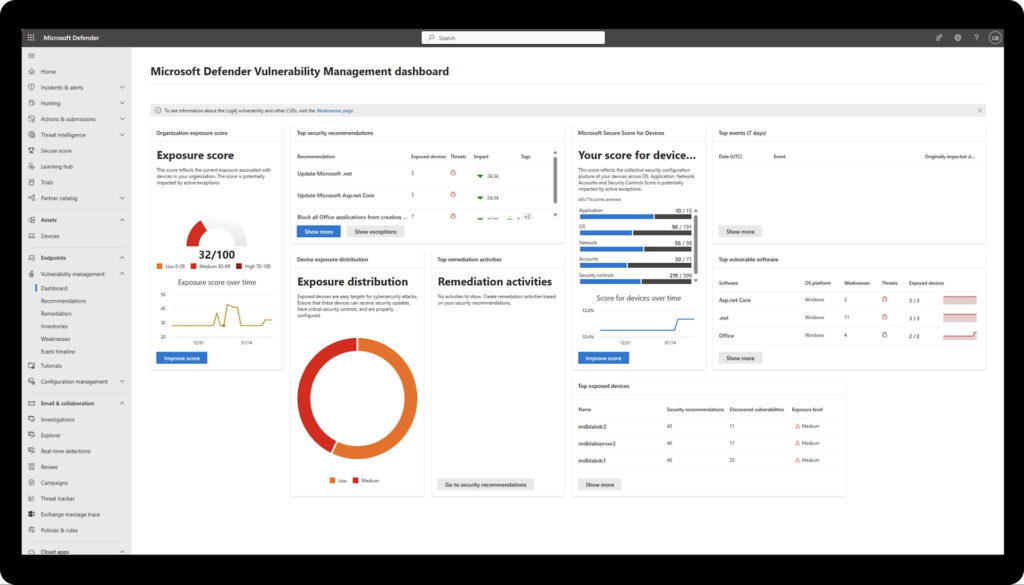
Centralized Microsoft 365 Defender dashboard to monitor, report, and act.

Next-Generation Protection

Cloud-based antivirus with behavioral AI to detect and stop emerging threats.

Endpoint Detection &
Response (EDR)

Detect, examine, and control suspicious activity across all connected devices.

Automated Investigation & Remediation (AIR)

Resolve routine alerts using AI to shift focus toward high-impact security tasks.

Threat & Vulnerability
Management

Deliver ongoing risk analysis with prioritized remediation actions.

Benefits You Can See From Day One

From fast deployment to built-in compliance and seamless Microsoft 365 integration, Microsoft Defender for Business delivers practical security advantages you’ll notice right away with no added complexity or overhead. 

Streamlined Deployment

Deploy in minutes with no need for on-premises infrastructure.

Accelerated Threat Containment

Quarantine infected endpoints in seconds to limit spread and impact.

Optimized Security Operations

AI filters out noise, reducing alert fatigue by up to 80%

Compliance-Ready Reporting

Meet PCI DSS, ISO 27001, and local data privacy requirements with built-in tools.

Scalable Licensing Model

Start with 25 users and scale to 300 without reconfiguration or migration.

Native Microsoft 365 Integration

Extend endpoint protection across Teams, SharePoint, and Exchange Online automatically.

Defender for Business Coverage Breakdown

For organizations with over 300 users or server workloads, Tech One Philippines can upgrade you to Microsoft Defender for Endpoint Plan 2 or Microsoft Defender XDR using the same security agent and console to ensure a seamless and uninterrupted experience. 

Security That Follows Your Dynamic Workforce

Endpoint / Service Coverage Highlights
Windows10/11 & WindowsServer 
Includes next-generation antivirus, Endpoint Detection and Response (EDR), and vulnerability management.
macOS 
Delivers real-time protection and advanced threat analytics.
iOS & Android
Provides mobile threat defense with phishing protection and app risk controls.
Linux
Secures server and container workloads with endpoint-level protection.
Web & Email 
Enforces Safe Links, Safe Attachments, and web content filtering for secure communication.
Cloud Apps
Integrates with Defender for Cloud Apps for visibility and governance across SaaS platforms.

Defender for Business integrates natively with Microsoft 365, Entra ID, Intune, and the Microsoft Defender XDR ecosystem to enable unified security management across your environment. 

Licensing Options

Plan Inclusions Ideal For
Microsoft Defender for Business Stand-Alone
Full Defender for Business feature set for up to 300 users

SMBs that need enterprise-grade protection without Microsoft 365 Business Premium

Microsoft 365 Business Premium
Defender for Business plus Office apps, Teams, SharePoint, Intune, and Entra ID Premium
Businesses looking for a complete productivity and security solution
Enterprise Add-Ons (E5 Security / Defender for Endpoint P2)
Advanced XDR, cloud security capabilities, and insider risk management tools
Mid-market and enterprise organizations scaling beyond 300 users

* Regional pricing may vary. Get in touch with Tech One Philippines for an official quotation and promotional bundle details.

Why Partner with Tech One Philippines

Microsoft-Certified Expertise

Recognized as a Microsoft Country Partner, our team of over 60 certified specialists delivers expert implementation and long-term optimization tailored to your needs.

Strategic Security Alignment

We conduct a thorough assessment of your IT landscape and configure Microsoft Defender for Business to match your operational goals and risk profile.

End-to-End Service Delivery

From initial planning to deployment, training, and 24/7 managed support, we serve as your dedicated cybersecurity partner at every stage.

Regional Experience You Can Trust

More than 3,000+ enterprises across Southeast Asia have chosen us to secure and modernize their digital environments.

Driven by Innovation

We stay ahead of evolving threats by embedding AI-powered threat intelligence and the latest Microsoft technologies into every solution.

Frequently Asked Questions

What is Microsoft Defender for Business

Microsoft Defender for Business is a comprehensive endpoint security solution designed specifically for small and medium-sized businesses (up to 300 employees). It has Enterprise-Grade Protection, AI-powered Capabilities, Vulnerability Management, Ransomware Protection, Simplified SecOps, and Automated Investigation and Remediation, to mention a few. Tech One Global is a leading Microsoft security partner that can help you maximize and tailor fit Microsoft Defender for Business to your requirements.


Why Choose Tech One Global when adopting Microsoft Defender for Business?

Tech One Global is a recognized Microsoft security solution partner. They provide expert support and personalized guidance when implementing Microsoft Defender for Business. With deep experience and expertise in security, we help ensure a smooth setup, fast deployment, and tailored security strategies that fit your business needs.

Importance of cybersecurity for small and medium-sized businesses

Cybersecurity is essential for small and medium-sized businesses because they’re often targeted by cyberattacks due to limited security resources. Protecting data, systems, and customer information helps prevent costly breaches, builds trust, and ensures business continuity.

Supported Platforms with Microsoft Defender for Business

Microsoft Defender for Business works with Windows, macOS, Android, and iOS devices. This allows businesses to secure a wide range of endpoints, whether employees are working on desktops, laptops, or mobile devices.

Key Features of Microsoft Defender for Business

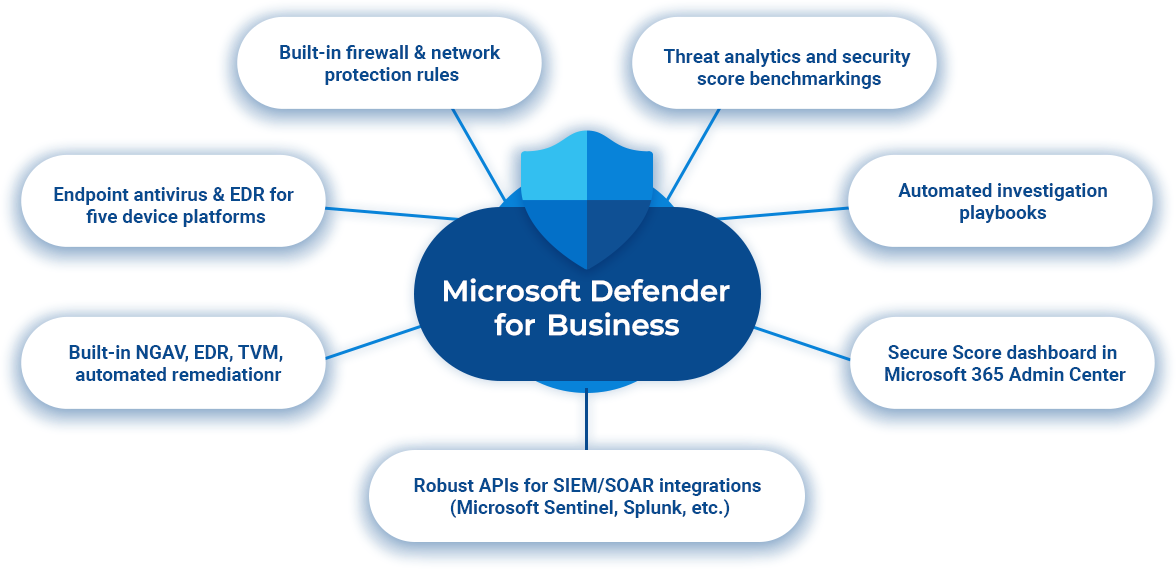
Some of the main features include next-generation antivirus, endpoint detection and response (EDR), automated investigation and remediation, threat and vulnerability management, and built-in firewall protection—all designed to stop threats before they cause harm.

Benefits of Using Microsoft Defender for Business

Using Microsoft Defender for Business helps protect your company from cyber threats with tools that are powerful yet simple to use. It reduces the risk of attacks, keeps sensitive data safe, and gives your team peace of mind—without needing a large IT team.

What's included with Defender for Business?

Defender for Business includes comprehensive endpoint security features such as threat protection, automated threat response, centralized management, and secure device control. It’s a complete solution built to defend against modern cyber threats.

What is Microsoft Defender used for in the Philippines?

Microsoft Defender is the built-in antivirus and security solution included with Windows 10 and Windows 11, designed to protect Filipino users against viruses, phishing attacks, ransomware, spyware, and other common online threats. It offers real-time protection, automatic updates, and cloud-based threat detection, making it a dependable security option for both personal use and business environments in the Philippines. Since it’s pre-installed on Windows devices, there’s no need for additional downloads—Microsoft Defender starts protecting your system right out of the box. As more users in the country search for free antivirus protection for Windows in the Philippines or built-in cybersecurity tools for SMEs, Microsoft Defender continues to be a trusted choice. Tech One Global Philippines helps businesses enhance their cybersecurity posture by configuring Microsoft Defender for Endpoint, enabling advanced threat protection, and ensuring compliance with local and global security standards.

Yes, for most Filipino users, Microsoft Defender provides strong, built-in protection that’s sufficient for everyday use. It includes real-time threat detection, anti-virus and anti-malware protection, a built-in firewall, anti-phishing tools, and automatic security updates, making it ideal for home users, students, and small offices in the Philippines. It helps guard against common threats such as viruses, ransomware, and unsafe websites without the need for third-party antivirus software. However, if your organization handles sensitive data, operates in regulated industries, or requires advanced threat management, you may benefit from Microsoft Defender for Business, which includes centralized control, endpoint detection and response (EDR), and threat analytics. Filipino businesses often search for is Microsoft Defender good enough for small business in the Philippines or enterprise-level antivirus for Windows 11 in the Philippines. Tech One Global Philippines helps users and companies assess their security needs and implement the right Microsoft Defender solution for optimal protection and compliance.

Microsoft Defender for Business is a premium cybersecurity solution designed specifically for small and medium-sized enterprises (SMEs) in the Philippines. It offers advanced protection features such as endpoint detection and response (EDR), threat and vulnerability management, automated investigation and remediation, and centralized security management for up to 300 users. Defender for Business helps Filipino companies strengthen their defenses against ransomware, phishing, and targeted attacks—going beyond the standard antivirus protection included in Windows. It’s ideal for businesses looking for an affordable, enterprise-grade security solution that aligns with their growing IT needs. Tech One Global Philippines is a certified Microsoft Solutions Partner that provides Defender for Business licensing, secure deployment, configuration, and ongoing local support to help protect your organization from modern cyber threats.

Yes, Microsoft Defender can protect multiple devices in the Philippines when used with a Microsoft 365 Personal or Family subscription, or through Microsoft Defender for Business. It offers cross-platform protection for Windows PCs, Macs, Android smartphones, and iPhones, providing features such as real-time threat detection, web protection, phishing alerts, and a unified security dashboard to monitor and manage all connected devices. This makes it ideal for families, remote workers, or small businesses in the Philippines that use a mix of devices and want a simple yet reliable cybersecurity solution. Tech One Global Philippines supports users and organizations in setting up Microsoft Defender across multiple devices, offering expert guidance and local support for seamless security management.

You can buy Microsoft Defender for Enterprise in the Philippines through certified Microsoft partners like Tech One Global Philippines. As a trusted Microsoft Solutions Partner, Tech One provides licensing guidance, deployment support, and local expertise to help organizations implement enterprise-grade security across their IT environments. Microsoft Defender for Enterprise is typically included in Microsoft 365 E5 or available as an add-on, offering advanced threat protection, endpoint detection and response (EDR), and centralized management for large organizations. Tech One Global Philippines makes it easy to get started by helping you choose the right plan, configure the solution, and ensure your organization is protected with Microsoft’s most powerful security tools.

For most users in the Philippines, Microsoft Defender provides sufficient protection against common threats such as malware, phishing attacks, ransomware, and suspicious applications. It is built into Windows 10 and 11, updates automatically, and includes features like real-time protection, firewall integration, and cloud-based threat detection. Many Filipino users choose Defender because it’s free, reliable, and seamlessly integrated into Windows—making it a convenient option for home and small office use.

However, if you require additional features like VPN services, dark web monitoring, identity theft protection, or advanced parental controls, you may consider layering Defender with a third-party antivirus. Power users, businesses with complex needs, or those in regulated industries may benefit from Microsoft Defender for Business or an enhanced security stack. Tech One Global Philippines helps users and organizations assess their security requirements and choose the right Microsoft security solution—ensuring robust protection that fits your specific needs and budget.

Microsoft Defender is pre-installed and automatically activated on Windows 10 and Windows 11 devices in the Philippines—so there’s usually no need for manual setup unless another antivirus program is already installed. To check if Microsoft Defender is active on your PC:

1. Go to Settings

2. Click on Privacy & Security

3. Select Windows Security

4. Click Virus & Threat Protection

From there, you can view your device’s protection status and ensure real-time protection and cloud-based protection are turned on. If Microsoft Defender is turned off due to another antivirus, you’ll need to uninstall or disable the third-party software to reactivate it. Tech One Global Philippines helps individuals and businesses set up and optimize Microsoft Defender, ensuring devices are properly secured with the latest Microsoft threat protection features.

Yes, Microsoft Defender is available for Android and iOS devices in the Philippines. With an active Microsoft 365 Personal, Family, or Business subscription, users can download the Microsoft Defender app from the Google Play Store or Apple App Store to gain access to real-time threat alerts, web protection, anti-phishing tools, and device security monitoring. It helps safeguard your smartphone or tablet from malicious apps, unsafe links, and online threats—making it a reliable security option for both personal and business use. Tech One Global Philippines provides expert guidance on setting up Microsoft Defender across mobile devices, ensuring Filipino users get seamless and secure protection beyond their desktops.

Ready to Secure Your Business?

Book a free 30-minute security assessment with a TechOneGlobal specialist. Well map your current risks, show DefenderforBusiness in action, and craft a deployment plan that delivers ROI from dayone.